This website uses cookies. By clicking Accept, you consent to the use of cookies. Click Here to learn more about how we use cookies.
Turn on suggestions
Auto-suggest helps you quickly narrow down your search results by suggesting possible matches as you type.
Showing results for
- O2 Community
- Devices
- Android
- Re: Camera shutter noise
Options
- Subscribe to RSS Feed
- Mark Topic as New
- Mark Topic as Read
- Float this Topic for Current User
- Bookmark
- Subscribe
- Mute
- Printer Friendly Page
Options
- Mark as New
- Bookmark
- Subscribe
- Mute
- Subscribe to RSS Feed
- Permalink
- Report Content
on 06-09-2023 15:11
My phone did a software upgrade now camera makes a sound when i take a photo
I have googled and everything i found doesnt help me
Bet someone on here will help me please ?
Solved! Go to Solution.
Message 1 of 9
4,098 Views
1 ACCEPTED SOLUTION
Accepted Solutions

- 10769 Posts
- 113 Topics
- 1973 Solutions
on 06-09-2023 17:59
Options
- Mark as New
- Bookmark
- Subscribe
- Mute
- Subscribe to RSS Feed
- Permalink
- Report Content
on 06-09-2023 17:59
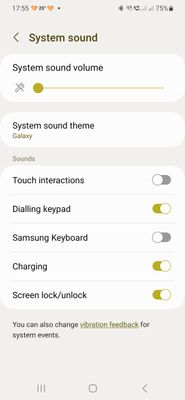
Turn down the system sounds in the phone settings. That works, and if you leave vibration on in the camera settings you know if the picture has taken
This is not O2 and we are all customers here similar to yourself and cannot answer account type queries.
Message 8 of 9
4,032 Views
8 REPLIES 8

- 13222 Posts
- 95 Topics
- 1188 Solutions
06-09-2023 15:33 - edited 06-09-2023 15:33
Options
- Mark as New
- Bookmark
- Subscribe
- Mute
- Subscribe to RSS Feed
- Permalink
- Report Content
06-09-2023 15:33 - edited 06-09-2023 15:33
What phone do you have @Poppysmum ?
On my Oppo, if I open the camera app and then settings there is an option to play a shutter sound.
Please note, this is not customer services and we cannot access your account. Do not publish personal details (email, phone number, bank account).
Link to our guide on how to contact them can be found here
Message 2 of 9
4,089 Views

Options
- Mark as New
- Bookmark
- Subscribe
- Mute
- Subscribe to RSS Feed
- Permalink
- Report Content
on 06-09-2023 15:37
Turning the volume down usually stops it.
I have no affiliation whatsoever with O2 or any subsidiary companies. Comments posted are entirely of my own opinion. This is not Customer Service so we are unable to help with account specific issues.
Please select the post that helped you best and mark as the solution. This helps other members in resolving their issues faster. Thank you.
Please select the post that helped you best and mark as the solution. This helps other members in resolving their issues faster. Thank you.
Message 3 of 9
4,086 Views

- 1332 Posts
- 106 Topics
- 7 Solutions
on 06-09-2023 15:50
Options
- Mark as New
- Bookmark
- Subscribe
- Mute
- Subscribe to RSS Feed
- Permalink
- Report Content
on 06-09-2023 15:50
I have been in camera settings and its not there
phone is a Samsung Galaxy A52 5G SM-A526B
Message 4 of 9
4,079 Views
- 1332 Posts
- 106 Topics
- 7 Solutions
on 06-09-2023 15:52
Options
- Mark as New
- Bookmark
- Subscribe
- Mute
- Subscribe to RSS Feed
- Permalink
- Report Content
on 06-09-2023 15:52
Volume down on phone or camera ?
Idiot here lol i dont want turn volume down it worked before i pressed and took pic silent
Message 5 of 9
4,078 Views
Options
- Mark as New
- Bookmark
- Subscribe
- Mute
- Subscribe to RSS Feed
- Permalink
- Report Content
on 06-09-2023 16:05
The phone volume.
If there's no setting for it, that's your only option @Poppysmum
I have no affiliation whatsoever with O2 or any subsidiary companies. Comments posted are entirely of my own opinion. This is not Customer Service so we are unable to help with account specific issues.
Please select the post that helped you best and mark as the solution. This helps other members in resolving their issues faster. Thank you.
Please select the post that helped you best and mark as the solution. This helps other members in resolving their issues faster. Thank you.
Message 6 of 9
4,073 Views
- 1332 Posts
- 106 Topics
- 7 Solutions
on 06-09-2023 16:28
Options
- Mark as New
- Bookmark
- Subscribe
- Mute
- Subscribe to RSS Feed
- Permalink
- Report Content
on 06-09-2023 16:28
Thank you i will mess about with settings and hope i dont break something else lol
Message 7 of 9
4,058 Views
- 10769 Posts
- 113 Topics
- 1973 Solutions
on 06-09-2023 17:59
Options
- Mark as New
- Bookmark
- Subscribe
- Mute
- Subscribe to RSS Feed
- Permalink
- Report Content
on 06-09-2023 17:59
Turn down the system sounds in the phone settings. That works, and if you leave vibration on in the camera settings you know if the picture has taken
This is not O2 and we are all customers here similar to yourself and cannot answer account type queries.
Message 8 of 9
4,033 Views
- 1332 Posts
- 106 Topics
- 7 Solutions
09-09-2023 19:47 - edited 09-09-2023 19:48
Options
- Mark as New
- Bookmark
- Subscribe
- Mute
- Subscribe to RSS Feed
- Permalink
- Report Content
09-09-2023 19:47 - edited 09-09-2023 19:48
Thank you that worked when i knew what to look for 
Message 9 of 9
3,994 Views


