This website uses cookies. By clicking Accept, you consent to the use of cookies. Click Here to learn more about how we use cookies.
Turn on suggestions
Auto-suggest helps you quickly narrow down your search results by suggesting possible matches as you type.
Showing results for
- O2 Community
- Devices
- Android
- Re: Annoying little O2 Icon
Options
- Subscribe to RSS Feed
- Mark Topic as New
- Mark Topic as Read
- Float this Topic for Current User
- Bookmark
- Subscribe
- Mute
- Printer Friendly Page
Annoying little O2 Icon

Anonymous
Not applicable
on 19-07-2015 14:41
Options
- Mark as New
- Bookmark
- Subscribe
- Mute
- Subscribe to RSS Feed
- Permalink
- Report Content
on 19-07-2015 14:41
So two days into my S6 experience and this is annoying me!
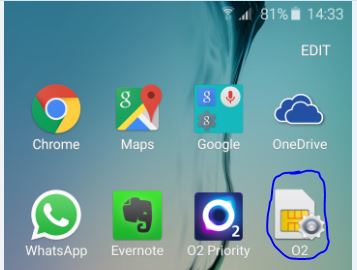
If you click on it you get this
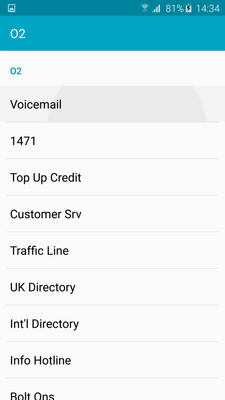
These are various numbers - just out of interest the Customer Srv number is for PAYG - I am on refresh.
Despite my best efforts I can't delete this O2 icon, if I select edit on the screen it's on the little delete icon that appears on other icons isn't on the O2 icon and and if i press and hold there is no delete option to drag it to.
Not a big deal I know - but anyone have any ideas how to remove it?
Message 1 of 13
8,955 Views
12 REPLIES 12
Anonymous
Not applicable
on 19-07-2015 14:43
Options
- Mark as New
- Bookmark
- Subscribe
- Mute
- Subscribe to RSS Feed
- Permalink
- Report Content
on 19-07-2015 14:43
Can you not put it into a folder that could be for junk or apps that you don't use
Message 2 of 13
8,412 Views
Options
- Mark as New
- Bookmark
- Subscribe
- Mute
- Subscribe to RSS Feed
- Permalink
- Report Content
19-07-2015 14:47 - edited 19-07-2015 14:47
I have put it into the goole folder, but any ideas on removing it appreciated.
Message 3 of 13
8,406 Views

- 134416 Posts
- 846 Topics
- 7624 Solutions
19-07-2015 14:47 - edited 19-07-2015 14:48
Options
- Mark as New
- Bookmark
- Subscribe
- Mute
- Subscribe to RSS Feed
- Permalink
- Report Content
19-07-2015 14:47 - edited 19-07-2015 14:48
Or drag it into the delete bin?
edit. Just noticed you tried that...
Veritas Numquam Perit

Message 4 of 13
8,404 Views

- 154741 Posts
- 658 Topics
- 29443 Solutions
on 19-07-2015 14:53
Options
- Mark as New
- Bookmark
- Subscribe
- Mute
- Subscribe to RSS Feed
- Permalink
- Report Content
on 19-07-2015 14:53
You can't delete it unless you flash non O2 firmware as it's part of the O2 bloatware in their ROM.
I have no affiliation whatsoever with O2 or any subsidiary companies. Comments posted are entirely of my own opinion. This is not Customer Service so we are unable to help with account specific issues.
Please select the post that helped you best and mark as the solution. This helps other members in resolving their issues faster. Thank you.
Please select the post that helped you best and mark as the solution. This helps other members in resolving their issues faster. Thank you.
Message 5 of 13
8,393 Views

Options
- Mark as New
- Bookmark
- Subscribe
- Mute
- Subscribe to RSS Feed
- Permalink
- Report Content
on 19-07-2015 14:55
Debrand will remove it

Message 6 of 13
8,392 Views
Options
- Mark as New
- Bookmark
- Subscribe
- Mute
- Subscribe to RSS Feed
- Permalink
- Report Content
on 19-07-2015 14:57
Tardis.
You may be able to find it in apps settings and disable it. But not sure.
You may be able to find it in apps settings and disable it. But not sure.
Message 7 of 13
8,388 Views
Options
- Mark as New
- Bookmark
- Subscribe
- Mute
- Subscribe to RSS Feed
- Permalink
- Report Content
on 19-07-2015 14:58
@MI5 wrote:
You can't delete it unless you flash non O2 firmware as it's part of the O2 bloatware in their ROM.
That's what I had assumed - not thought through at all really - quick link to PAYG CS on a contract phone!! Oh well it will have to live in the google folder - I don't go in there too often!
Message 8 of 13
8,380 Views
Options
- Mark as New
- Bookmark
- Subscribe
- Mute
- Subscribe to RSS Feed
- Permalink
- Report Content
on 19-07-2015 15:01

- 98634 Posts
- 617 Topics
- 7252 Solutions
on 19-07-2015 15:03
Options
- Mark as New
- Bookmark
- Subscribe
- Mute
- Subscribe to RSS Feed
- Permalink
- Report Content
on 19-07-2015 15:03
You should be able to delete it from your home screen but it will always be in the app drawer.


Message 10 of 13
8,372 Views


