This website uses cookies. By clicking Accept, you consent to the use of cookies. Click Here to learn more about how we use cookies.
Turn on suggestions
Auto-suggest helps you quickly narrow down your search results by suggesting possible matches as you type.
Showing results for
- O2 Community
- Products & Services
- Other Products and Services
- Cancel Disney +
Options
- Subscribe to RSS Feed
- Mark Topic as New
- Mark Topic as Read
- Float this Topic for Current User
- Bookmark
- Subscribe
- Mute
- Printer Friendly Page

Options
- Mark as New
- Bookmark
- Subscribe
- Mute
- Subscribe to RSS Feed
- Permalink
- Report Content
on 26-09-2020 16:33
1 ACCEPTED SOLUTION
Accepted Solutions
Options
- Mark as New
- Bookmark
- Subscribe
- Mute
- Subscribe to RSS Feed
- Permalink
- Report Content
on 26-09-2020 16:36
@Chris1568 Go to your extras in your MyO2 http://www.o2.co.uk/myo2
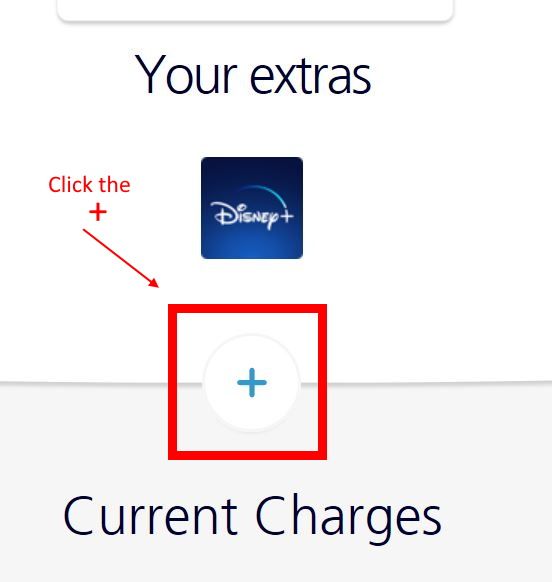
Click on the + sign beneath your extra and then click manage.
Turn off the auto renew switch.
I have no affiliation whatsoever with O2 or any subsidiary companies. Comments posted are entirely of my own opinion. This is not Customer Service so we are unable to help with account specific issues.
Please select the post that helped you best and mark as the solution. This helps other members in resolving their issues faster. Thank you.
Please select the post that helped you best and mark as the solution. This helps other members in resolving their issues faster. Thank you.
Message 2 of 8
1,763 Views
7 REPLIES 7
Options
- Mark as New
- Bookmark
- Subscribe
- Mute
- Subscribe to RSS Feed
- Permalink
- Report Content
on 26-09-2020 16:36
@Chris1568 Go to your extras in your MyO2 http://www.o2.co.uk/myo2
Click on the + sign beneath your extra and then click manage.
Turn off the auto renew switch.
I have no affiliation whatsoever with O2 or any subsidiary companies. Comments posted are entirely of my own opinion. This is not Customer Service so we are unable to help with account specific issues.
Please select the post that helped you best and mark as the solution. This helps other members in resolving their issues faster. Thank you.
Please select the post that helped you best and mark as the solution. This helps other members in resolving their issues faster. Thank you.
Message 2 of 8
1,764 Views
Options
- Mark as New
- Bookmark
- Subscribe
- Mute
- Subscribe to RSS Feed
- Permalink
- Report Content
on 26-09-2020 18:54
MI5
Thanks that helped all sorted now thanks again
Thanks that helped all sorted now thanks again
Message 3 of 8
1,729 Views

- 154842 Posts
- 659 Topics
- 29445 Solutions
on 26-09-2020 18:59
Options
- Mark as New
- Bookmark
- Subscribe
- Mute
- Subscribe to RSS Feed
- Permalink
- Report Content
on 26-09-2020 18:59
You're welcome
I have no affiliation whatsoever with O2 or any subsidiary companies. Comments posted are entirely of my own opinion. This is not Customer Service so we are unable to help with account specific issues.
Please select the post that helped you best and mark as the solution. This helps other members in resolving their issues faster. Thank you.
Please select the post that helped you best and mark as the solution. This helps other members in resolving their issues faster. Thank you.
Message 4 of 8
1,724 Views

- 2 Posts
- 1 Topics
- 0 Solutions
on 06-10-2020 14:31
Options
- Mark as New
- Bookmark
- Subscribe
- Mute
- Subscribe to RSS Feed
- Permalink
- Report Content
on 06-10-2020 14:31
I have tried this but cannot see any auto renew switch?
Message 5 of 8
1,658 Views
- 154842 Posts
- 659 Topics
- 29445 Solutions
on 06-10-2020 15:19
Options
- Mark as New
- Bookmark
- Subscribe
- Mute
- Subscribe to RSS Feed
- Permalink
- Report Content
on 06-10-2020 15:19
I promise you it is there.
Look for the BIG + sign beneath your extra, then click "Manage" then you will see the switch to turn off.
I have no affiliation whatsoever with O2 or any subsidiary companies. Comments posted are entirely of my own opinion. This is not Customer Service so we are unable to help with account specific issues.
Please select the post that helped you best and mark as the solution. This helps other members in resolving their issues faster. Thank you.
Please select the post that helped you best and mark as the solution. This helps other members in resolving their issues faster. Thank you.
Message 6 of 8
1,652 Views
- 4 Posts
- 1 Topics
- 0 Solutions
on 02-01-2021 09:47
Options
- Mark as New
- Bookmark
- Subscribe
- Mute
- Subscribe to RSS Feed
- Permalink
- Report Content
on 02-01-2021 09:47
I've been looking for this and it is just the Big + underneath the Disney picture
Message 7 of 8
1,504 Views

- 134771 Posts
- 847 Topics
- 7624 Solutions
on 02-01-2021 10:10
Options
- Mark as New
- Bookmark
- Subscribe
- Mute
- Subscribe to RSS Feed
- Permalink
- Report Content
on 02-01-2021 10:10
That's correct @Madtyke61
If you click on that + sign a drop down box appears and allows you to turn off auto renew. 
Veritas Numquam Perit

Message 8 of 8
1,502 Views


Related Content
- Cancel business contract for pay as you go in Business Customers
- Pensioner cannot get out of a contract with out Passport or Drivers licence in Pay Monthly
- Disney+ free offer for 6 months not covering cost of disney+ !! in Pay Monthly
- Watch upgrade cancelled my sim only contract in Pay Monthly
- Request to Apply SIM Offer to My Current Number in Pay Monthly
New Solutions

