cancel
Showing results for 
Search instead for 
Did you mean: 

How to Lengthen Ringtime on any O2 Mobile

jonsie
Level 94: Supreme
  • 98629 Posts
  • 617 Topics
  • 7252 Solutions
Registered:
How to Lengthen Ringtime on any O2 Mobile. This is for all Pay Monthly and Pay and Go mobiles.

The following method will work on any O2 mobile and means you can control the time interval before a call goes to Voicemail.

Important ::

If you have wifi calling enabled, you may need to disable it before you use any of the codes in this guide. You can enable wifi calling again after changing any voicemail settings.

On your keypad, dial 1750 to switch on voicemail.


Enter the following into your keypad as though you were just making a call :


**61*901*11*30# then simply press 'call'.


Please note 30 is the time in seconds before voicemail kicks in and can be set in increments of 5 ie. 05, 10, 15, 20, 25 to a maximum of 30 seconds. (also see video)


This can also be requested via MyO2, App, or Web, following the below instructions ↘️


App


  • Support
  • Phones, SIMS and devices
  • Manage my device
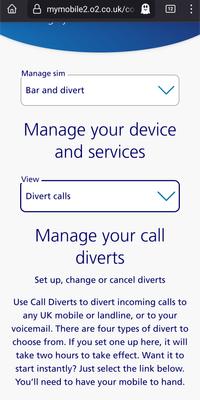
  • From the drop down Manage sim menu select: Bar and divert, from the View menu select: Divert calls
  •  Scroll to the bottom and you have a comprehensive Call Diverts menu to Edit (bottom left)
 

Web:


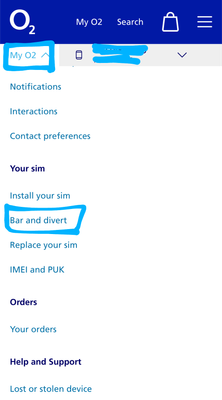
Under the MyO2 drop down


  • Under the Your Sim heading select Bar and divert
  • Under the heading Manage your devices and services select Divert calls
  • Scroll down and you have a comprehensive Call Diverts menu to Edit (bottom left)
 

DaveO2_0-1718978378517.png
 
DaveO2_1-1718978401651.png


Alternatively, you can switch voicemail off completely by calling 1760 from your mobile when you know you will be available to answer calls. Switch on again when needed by calling 1750.


More info on Voicemail here : Using Voicemail | Support | O2

and :

Community Guide : Voicemail : All You Need to Know


Just a tip : To avoid charges when travelling overseas switch off voicemail before you go as you may not be able to do so once you have left the UK and the O2 Network. Charges for left messages on aircraft, cruise ships and ferries can be huge.


55 Comments
phonek
Level 3: Thinker
  • 93 Posts
  • 6 Topics
  • 0 Solutions
Registered:

@Dave-O2 – It's not just a 180 single option... it's every 5-seconds; i.e. 35/40/45...170/175/180 max. 


I'll PM you both our numbers, same address, and sir name. 

Dave-O2
Community Manager
Community Manager
  • 1737 Posts
  • 117 Topics
  • 136 Solutions
Registered:

Thanks @phonek 


I have your PM & i'll be back in touch as soon as i can 👍

phonek
Level 3: Thinker
  • 93 Posts
  • 6 Topics
  • 0 Solutions
Registered:

@Dave-O2 

STILL(!) being given the run-around by overseas call centre staff. 


Two calls from them over three days... all they do is repeat the same setup questions, offer no answers, and say there is no problem with O2's backend systems. Despite the clear evidence there certainly is, given NOTHING WORKS TO FIX IT! 


When you mention about the website setting offering up to 180-seconds, they ignore that point, and change the subject without ever bothering to explain. I had to just hang-up right now, due to their attitude problem. 


What a complete shambles and a waste of customers' time. 


phonek
Level 3: Thinker
  • 93 Posts
  • 6 Topics
  • 0 Solutions
Registered:

This whole Rings to Divert doesn't work properly, yet no one at O2 are even bothered! angry_devil


phonek
Level 3: Thinker
  • 93 Posts
  • 6 Topics
  • 0 Solutions
Registered: